Group Analysis Tab
The Group Analysis tab provides admins with a centralized view of all Confluence groups and their permission footprint. It helps identify unused, over-privileged, empty, and risky groups so that access can be optimized before Cloud migration or during regular governance. By auditing these structures, organizations can reduce permission sprawl and ensure a safer access mapping strategy.
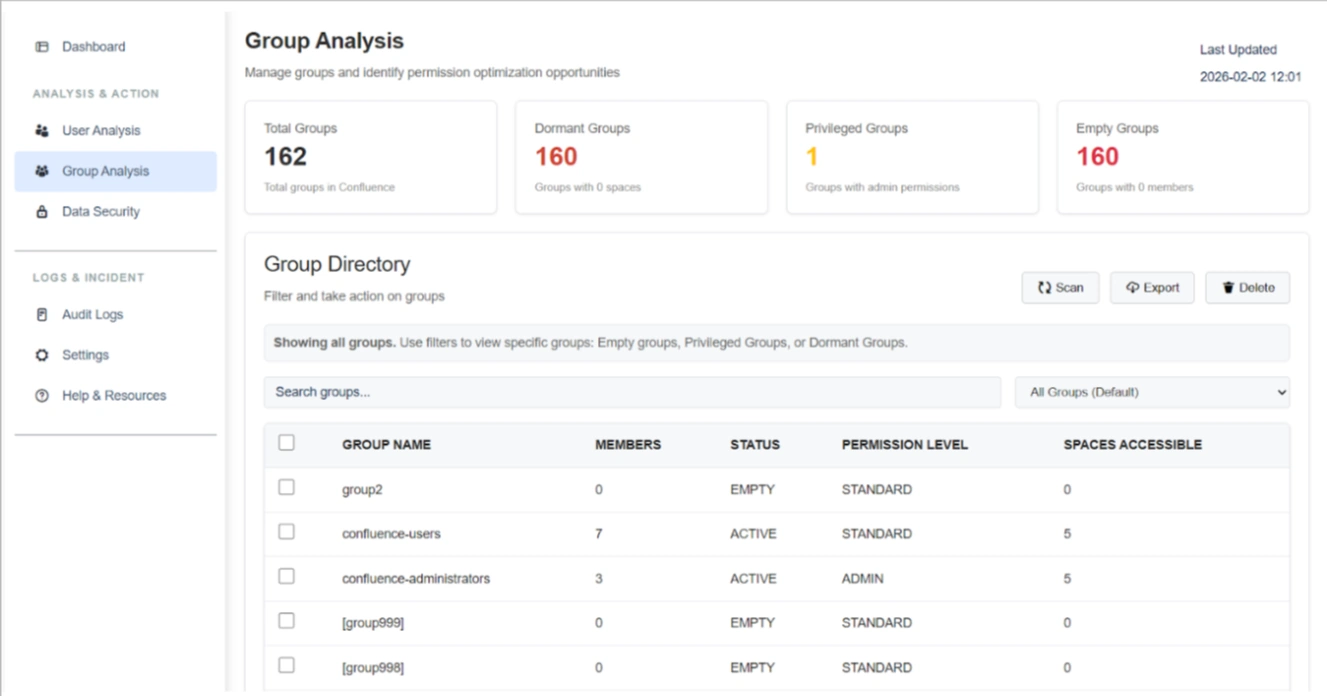
Listed below are the steps and settings required to optimize your group structures:
1. Group Risk & Health Metrics
The top dashboard widgets summarize structural weaknesses within your group directory:
- Total Groups: Displays the cumulative count of all groups currently in the instance (e.g., 162 groups).
- Dormant Groups: Identifies groups that have zero space-level permissions assigned. These are effectively unused but increase clutter and future misconfiguration risk.
- Privileged Groups: Highlights groups with admin-level permissions. These represent high-risk access points that require close monitoring to ensure proper role mapping.
- Empty Groups: Detects groups with zero members. These provide no functional value and are primary candidates for cleanup to reduce group sprawl.
2. Group Directory Attributes
The Group Directory table provides a granular breakdown of each group's attributes to assist in quick risk assessment:
- Member Count: Shows the number of users in a group to assess its actual usage.
- Status: Flags groups as "ACTIVE_GROUP", “PROVILEGED_GROUP”, "EMPTY_GROUP", etc., for immediate identification.
- Permission Level: Detects elevated access by labeling groups as "STANDARD_GROUP", “VIEW_SPACE”, "SYSTEM_ADMIN", etc.
- Spaces Accessible: Indicates the exact number of spaces a group can access to help you understand the potential data exposure impact.
3. Filters & Management Actions
Use the following tools to manage and execute cleanup workflows:
- Targeted Filters: Use the dropdown to search Empty, Privileged, or Dormant groups for immediate attention.
- Search Functionality: Quickly locate specific groups by name within large environments.
- Scan: Trigger a fresh audit to update group attributes and permission levels.
- Export: Generate a detailed report of group permissions for internal governance and compliance reviews.
- Delete: Permanently remove selected empty or redundant groups to simplify the Cloud permission scheme.
Benefits
Optimizing groups through this tab ensures:
- Reduced Permission Sprawl: A cleaner, more manageable group structure.
- Safer Access Mapping: Verified admin roles and reduced exposure risks.
Use Case
Scenario: During a pre-migration audit, an admin finds 150 Empty Groups. Instead of migrating these unnecessary structures and complicating the Cloud permission scheme, they filter for Empty Groups and Delete them in bulk. This ensures the Cloud instance starts with a clean, optimized group directory.