Dashboard Tab
The Migration Dashboard provides a real-time, high-level summary of your instance's hygiene, security posture, and overall migration risk.
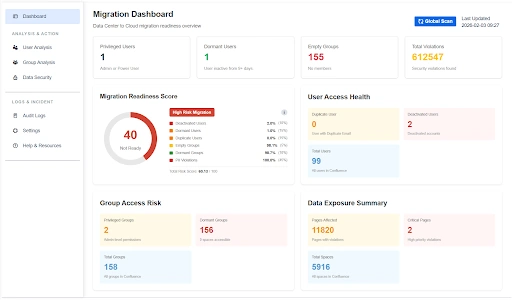
Dashboard Navigation & Metrics
The dashboard is divided into specialized widgets that categorize risks across users, groups, and data security.
- Global Scan: A primary action button used to trigger a comprehensive re-assessment of the entire instance to update these metrics.
Overview Metrics
- Total Violations: The cumulative number of security violations found across the instance (e.g., 612,547 found).
- Empty Groups: A specific counter for groups with no members, which should be removed to simplify the Cloud permission scheme.
- Privileged Users: This metric identifies the number of accounts with administrative permissions.
- Dormant Users: This identifies users who have not logged into the system for a configurable period, such as 90+ days.
1. Core Readiness Indicators
- Migration Readiness Score: A numerical value that visually indicates if your instance is "Not Ready" or "Ready" for migration based on weighted risk factors.
- High-Risk Migration Breakdown: A detailed list showing the percentage impact of deactivated users, dormant accounts, empty groups, and data violations on your total risk score.
2. User & Group Health
- User Access Health: Displays total user counts alongside critical cleanup targets, such as Duplicate Users (users with duplicate emails), and Deactivated Users.
- Group Access Risk: Highlights structural weaknesses by identifying Privileged Groups (admin-level permissions), Dormant Groups that have zero space access and Total Groups.
3. Data Exposure Summary
- Critical Pages: Identifies high-priority violations that require immediate encryption or deletion before migration.
- Data Impact: Shows the total number of Pages Affected and Total Spaces scanned, providing a clear scope of the required sanitization effort.
Sidebar Modules (Analysis & Action)
The left-hand navigation menu allows you to drill down into specific cleanup workflows:
-
User Analysis: Gain visibility into overall user account health, activity trends, licensing distribution, and lifecycle status to support informed account management decisions.
-
Group Analysis: Understand group structures, membership distribution, and access alignment across spaces to maintain streamlined and scalable permission governance.
-
Data Security: Monitor sensitive data exposure, review detected policy violations, and oversee remediation efforts to ensure organizational data protection standards are upheld.
-
Audit Logs: Access a comprehensive, tamper-resistant record of administrative and system activities to support transparency, oversight, and compliance requirements.
-
Settings: Manage global application configurations, including scan rules (Regex), system preferences, and other administrative controls that define how the platform operates.
Use Case
Scenario: A Migration Lead starts their morning by checking the Migration Readiness Score.
They notice the score is at 30 (Not Ready) and quickly identify via the High-Risk Migration Breakdown that data Violations are the primary reason. They use the Global Scan button to ensure they are looking at the latest data before assigning remediation tasks to the security team.