Role-Based SSO Restriction
This feature restricts SSO access based on WordPress user roles.
Why This Feature Matters
Restricting SSO by role lets administrators ensure that only authorized user groups can access specific Service Provider applications, reducing the attack surface and enforcing least-privilege access.
Where to Use It
Common use cases include:
- Internal vs external users
- Admin-only applications
- Partner or vendor access segregation
How It Works
- Only users with allowed roles can authenticate to a given SP.
- Unauthorized roles are denied SSO access.
Quick Steps
- Navigate to the IDP Single Sign-On plugin for WP in your WordPress dashboard.
- Click on the SSO Options tab.
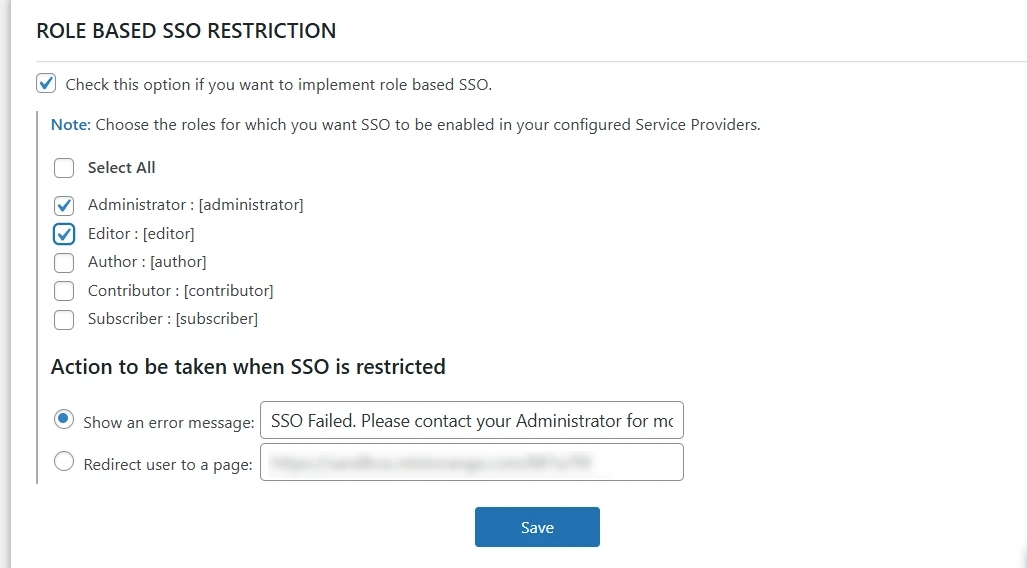
- Scroll down to the Role-Based SSO Restriction section.
- Enable the option, and from the dropdown, select the roles for which you want to allow SSO.
- If SSO is restricted for certain users, choose whether to:
- Display an error message to the user, or
- Redirect the user to a specific page.
Benefits
- Enforces least-privilege access to SP applications.
- Cleanly separates internal, external, and partner access.
- Configurable handling (error or redirect) for blocked users.
For more information, visit the SAML IDP for WordPress page.