Signed SAML Responses
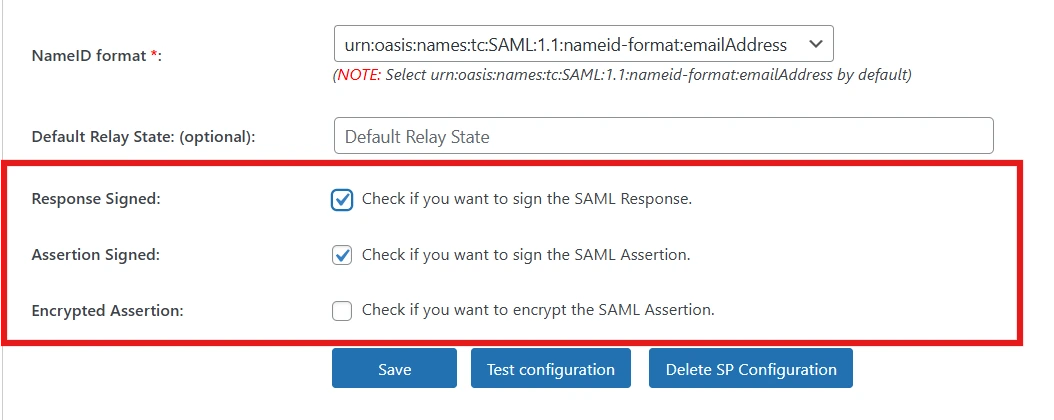
The miniOrange SAML IDP plugin for WordPress supports digitally signed SAML responses using X.509 certificates to ensure message integrity and authenticity.
Signing the SAML response ensures that:
- The response is generated by a trusted Identity Provider.
- The data has not been altered during transmission.
Why This Feature Matters
Digital signatures give Service Providers cryptographic proof that the response originated from your WordPress IDP and was not tampered with in transit a prerequisite for most enterprise integrations.
How It Works
-
WordPress signs the SAML Response or Assertion using a private key.
-
The Service Provider validates the signature using the IdP public certificate.
-
Authentication proceeds only if the signature is valid.
Benefits
- Prevents tampering and replay attacks.
- Required by most enterprise Service Providers.
- Enhances trust between IdP and SP.
SAML Response Verification
SAML response verification ensures that only valid and trusted authentication requests and responses are processed.
The plugin performs multiple validation checks, including:
- Issuer validation
- Destination URL validation
- Assertion validity (timestamps)
- Signature verification
- Audience restriction validation
Why It’s Important
- Prevents unauthorized or forged SAML responses.
- Ensures compliance with SAML 2.0 standards.
- Protects against impersonation attacks.
Only verified and trusted SAML responses are accepted by the Service Provider.
SAML Assertion Encryption
To further enhance security, the plugin supports encryption of SAML assertions, ensuring that sensitive user attributes remain confidential during transmission.
How Encryption Works
- WordPress encrypts the SAML Assertion using the Service Provider’s public certificate.
- Only the Service Provider can decrypt the assertion using its private key.
- User data remains protected even if intercepted.
Benefits
- Protects sensitive user attributes (email, roles, identifiers).
- Meets enterprise security and compliance requirements.
- Recommended for production and regulated environments.
Quick Steps
- Navigate to the Service Provider tab and select your configured SP.
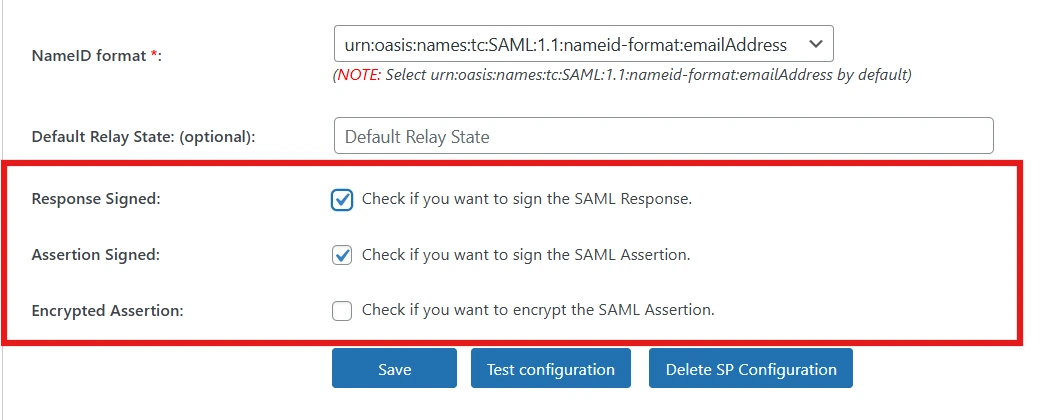
- Enable Sign Response/Assertion, upload or generate the X.509 certificate, and enable Encrypt Assertion as required.
- Save and test the SSO flow.
Security Summary
The miniOrange SAML IDP plugin for WordPress provides enterprise-grade security through:
- Signed SAML responses
- Encrypted SAML assertions
- Robust SAML response verification
- Secure Single Logout (SLO)
- Detailed login audit logs
These features ensure secure, reliable, and standards-compliant SAML authentication.
For more information, visit the SAML IDP for WordPress page.