SSO Login Audit
The SSO Login Audit feature provides detailed visibility into all SAML authentication events initiated through the SAML IDP plugin for WordPress.
It helps administrators monitor, analyze, and troubleshoot SSO activities across Service Providers.
Why This Feature Matters
Audit logs are essential for security investigations, compliance reporting, and diagnosing failed logins, giving administrators a reliable record of who accessed what, when, and through which Service Provider.
Where to Use It
Common use cases include:
- Troubleshooting failed SAML logins
- Tracking user access across applications
- Security audits and compliance reporting
- Identifying unusual login behaviour
This feature is especially useful in enterprise and production environments.
How It Works
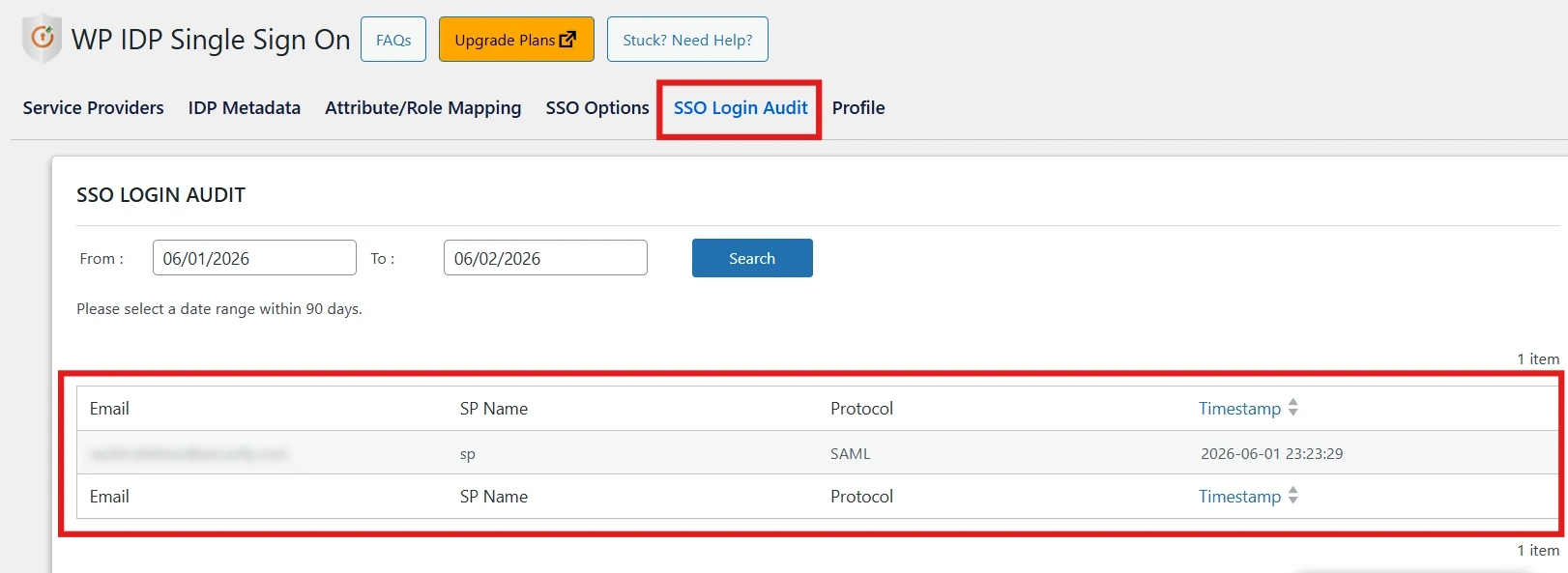
Each time a user performs SSO through the plugin, the event is recorded with key details, which administrators can review from the plugin dashboard.
Audit Details Captured
- Service Provider name
- Login timestamp
- Protocol
Quick Steps
- Navigate to the IDP Single Sign-On plugin for WP in your WordPress dashboard.
- Open the SSO Login Audit / Audit Logs section.
- Review or filter the logged authentication events.
Benefits
- Full visibility into SSO authentication activity.
- Supports compliance and security audits.
- Speeds up troubleshooting of login issues.
For more information, visit the SAML IDP for WordPress page.