Group Mapping
This feature allows you to map LDAP/AD groups to Drupal user groups. It ensures that users are automatically assigned to the appropriate groups in Drupal based on their LDAP group memberships, helping streamline user organization and access management.
Prerequisite
- Download and configure the Drupal LDAP module by referring to this setup guide.
- If you do not have any groups on your Drupal site, please create the group using the Drupal Group module.
Configure Group Mapping
- To configure this feature, after successful authentication, click on the Attribute Mapping button under the Mapping column.
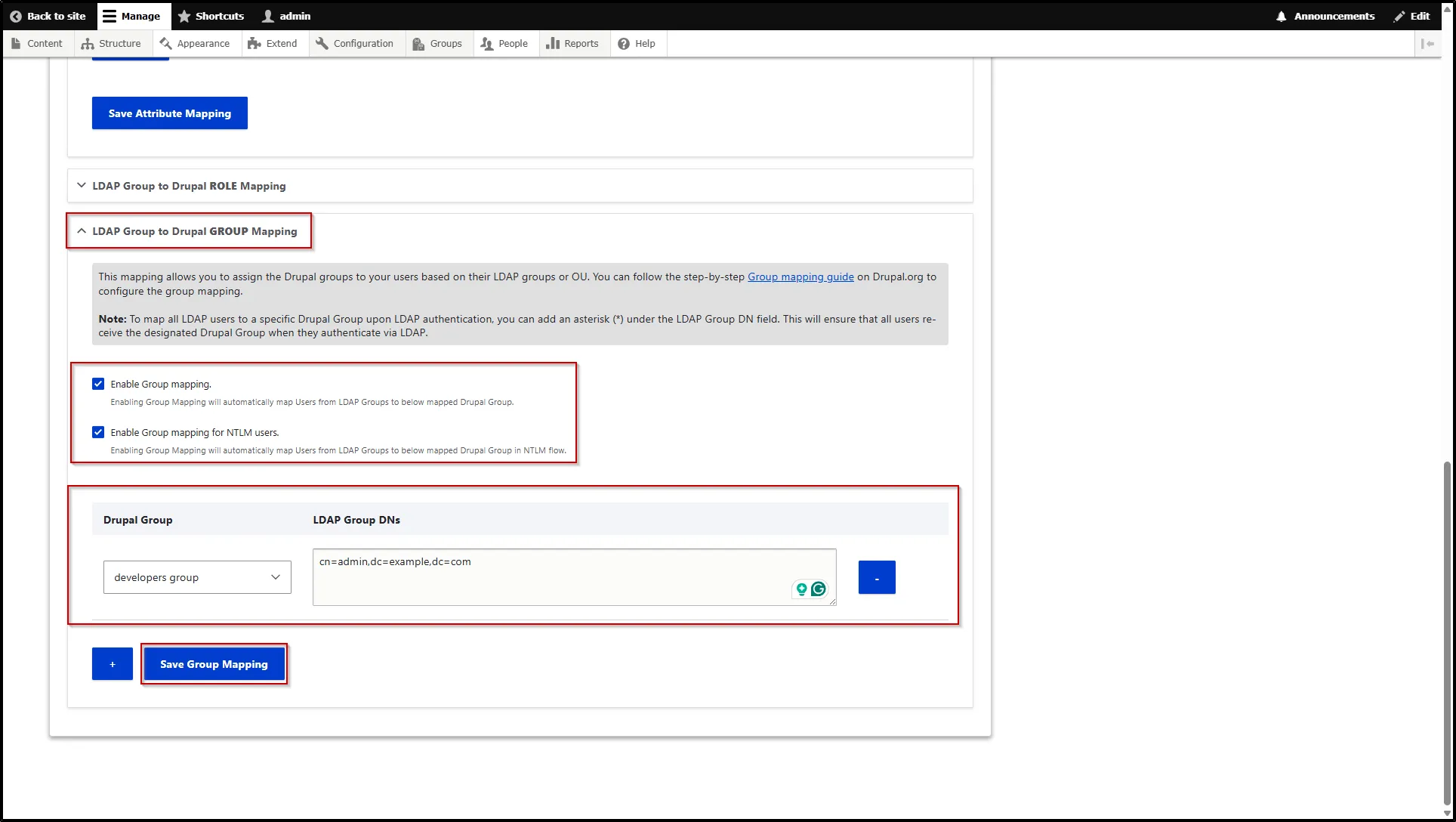
- Scroll down to the LDAP Group to Drupal GROUP Mapping section and expand it.
- Check the Enable Group Mapping check box. This is a mandatory step.
- Select the Enable Group Mapping for NTLM Users checkbox to map users from LDAP groups to Drupal groups during the NTLM authentication flow.
- Now, select the desired Drupal group from the Drupal Group dropdown to assign users mapped from the LDAP groups and enter the desired Group DN from your LDAP server under the LDAP Group DN textarea.
- Then, click the Save Group Mapping button.