Advanced settings for Attribute / Role Mapping with multiple IDP
The miniOrange SAML 2.0 SSO plugin provides advanced Attribute and Role Mapping capabilities to control how WordPress user attributes and roles are handled during SSO login.
The miniOrange plugin allows you to configure Advanced settings for mapping in two ways:
1. For All IDPs Fallback Configuration
To set up Advanced Settings for Attribute and Role Mapping that applies to all identity providers by default, follow the configuration guide here.
2. For a specific Identity Provider(IDP)
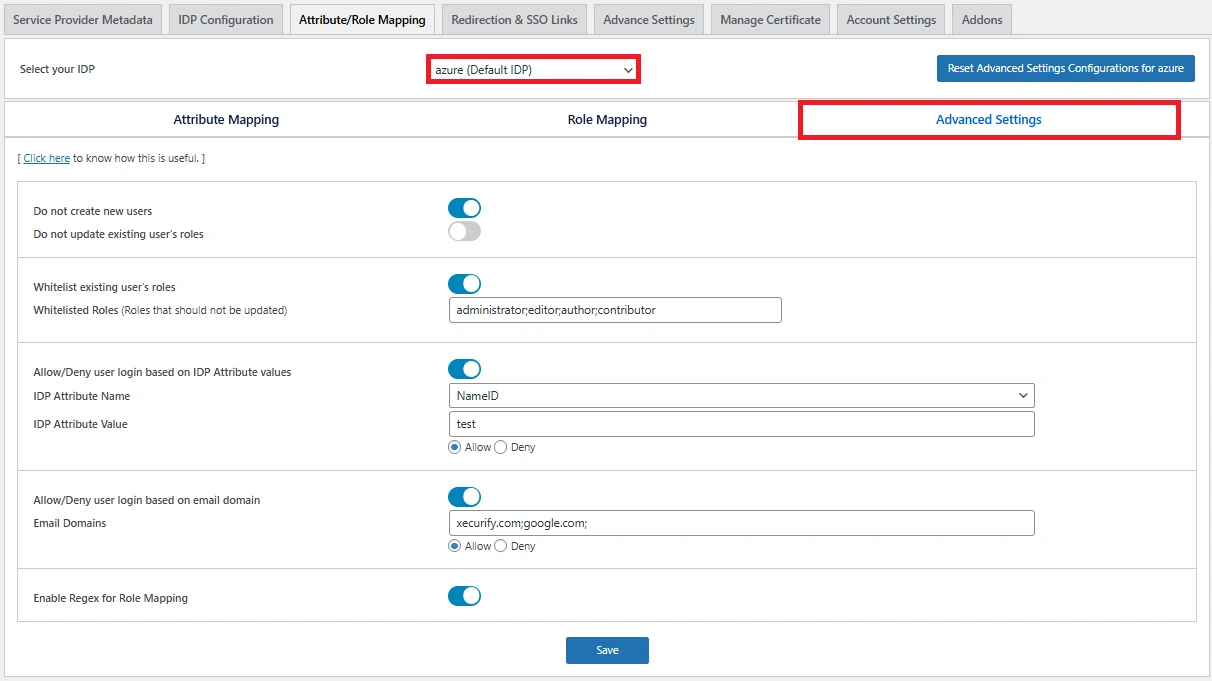
Follow the steps to configure Advanced Settings for a specific IDP:
- In the miniOrange SAML 2.0 SSO plugin, navigate to Attribute/Role Mapping >> Advanced Settings subtab.
- Select the IDP for which you want to configure attribute mapping.
- Configure advanced settings as required.
- Click on the Save button.
For more information visit our SSO for WordPress page.