Import/Export Configuration
This allows you to import or export your plugin configuration settings in case you have to change or activate/deactivate your plugin on another instance. This also gives you the ability to download and maintain the configuration file for your ideal configurations.
This would be useful in cases when:
- Upgrading from free version to paid version of the plugin .
- Migrating between different environments of your site.
- Upgrading to the latest version of the free/paid plugin.
This option can be found under the Service Provider Setup tab as shown below:
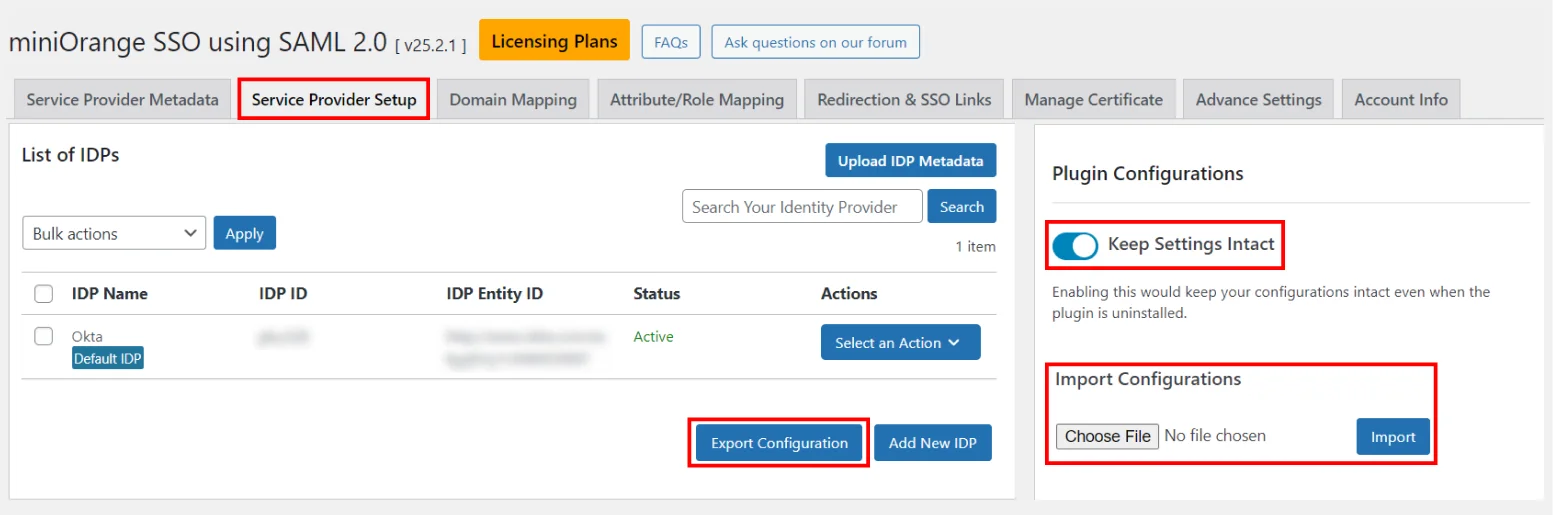
1. Keep Settings Intact
- Enabling the Keep Settings Intact toggle would keep your configurations intact even when the plugin is uninstalled or deleted.
2. Export Configurations
- Use this feature to export plugin configurations as a JSON file.
For ex: If you delete the plugin for some reason and later want to reinstall it with previous configurations, you can import the exported file to save time. - The file contains the following things :
- Complete configuration of your plugin
- Request generated from SP side
- Response received from Identity Provider
- Version and dependencies status
Note: Options 2 and 3 will only be present if the user has already done the test configuration.
3. Import Configurations
- Using this feature, you can import the exported configurations (i.e. JSON file) in the plugin.
For ex: For some reason you deleted the plugin and now want to install again, you can import the exported configurations so that the previous configurations will not be lost.
For more information visit our SSO for WordPress page.