Custom Certificate
- Custom Certificates are used as an encryption certificate to be provided by SP side to your Identity Providers.
- You can use your own custom certificate instead of the general X509 certificate provided in the plugin by default. This adds another layer of security to your configuration.
- Using your own custom certificate basically means replacing the default X509 certificate that comes with the plugin.
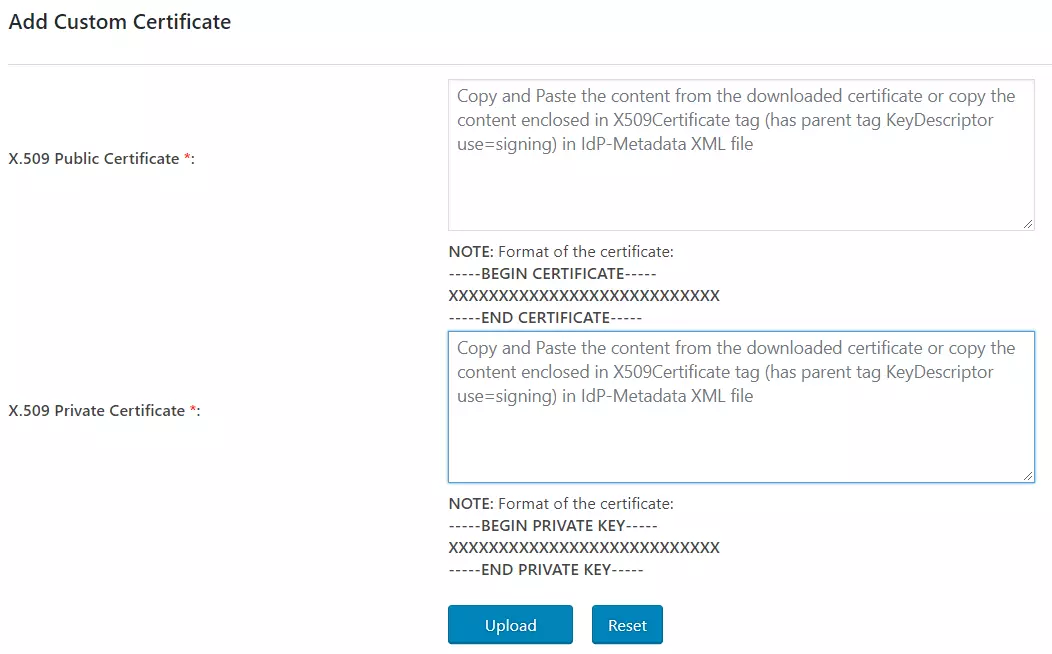
- In order to use your own custom certificate, you’ll have to copy and paste your Public and Private keys here as shown in the figure below.
How to generate a self-signed X.509 certificate using OpenSSL
-
Generate a private key:
openssl genrsa -out private.key 2048 -
Generate a self-signed X.509 certificate:
openssl req -new -x509 -key private.key -out certificate.crt -days 3650 -sha256
You'll be prompted to enter details such as:
- Country Name (2 letter code): US
- State or Province Name: California
- Locality Name: San Francisco
- Organization Name: Example Inc
- Organizational Unit Name: IT
- Common Name: example.com
- Email Address: admin@example.com
This creates:
private.key– Your private key (keep this secure)certificate.crt– Your X.509 certificate
For more information visit our SSO for WordPress page.